How to Choose the BEST Tablet For Students
The best tablet for students is one that matches your budget, note-taking needs, and multitasking requirements. Some tablets are better for handwriting, while others focus on performance or value. Choosing the right one depends on how you study and what features matter most.
Choosing the BEST Tablet For Students is not as easy as people say. Many students are told to just buy an iPad and move on. But that is not always the smartest choice.
The right tablet depends on your budget, study style, and whether you type more or write more by hand. In this guide, we break everything down in simple words so you can pick the perfect device for school, college, or university.
Quick Recommendation: What Should You Buy?
Why Choosing the BEST Tablet For Students Matters
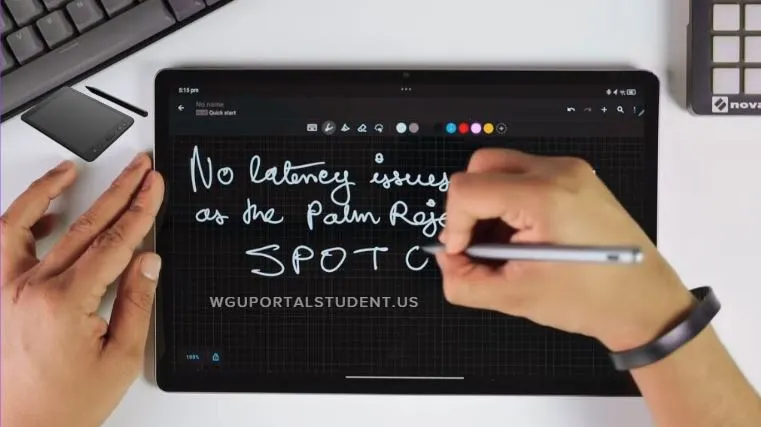
A tablet is more than just a screen. It becomes your:
But here is something important. The note-taking app you use matters just as much as the tablet itself.
Samsung Tablets for Students
Samsung Galaxy Tab S9 Series
Includes:
Tab S9
Tab S9 FE
Tab S10 FE
What Makes Them Good for Students?
S Pen included in the box
Smooth displays, up to 120 Hz
Samsung DeX desktop mode
Great for multitasking
The Tab S9 has the best AMOLED display. It feels smoother and more premium. It also supports an external monitor connection. The FE models are more budget-friendly. They are great for notes and media, but lack some premium features.
Who Should Buy It?
Budget note taker, Tab S9 FE
Balanced performance, Tab S9
Heavy multitasker, Tab S9
If sales are available, the Tab S9 often becomes the smartest overall choice.
Xiaomi and Lenovo Options
Xiaomi Pad 7
This tablet is a hidden gem.
144 Hz smooth display
Strong Snapdragon processor
Clean interface
Great multitasking mode
It performs better than most tablets in its price range. But the stylus must be bought separately.
Best for students who:
Read large PDFs
Multitask heavily
Want strong performance on a budget
Lenovo Idea Tab Pro and Motorola Pad 60 Pro
Large display
Stylus included
Decent note-taking
Good for students who want a big screen without spending too much. But performance is not as strong as Xiaomi’s.
Apple iPads for Students
iPad 11th Generation
Many call this the gold standard.
Pros
Very powerful A16 chip
Excellent app ecosystem
Smooth Pencil experience
Cons
Only a 60 Hz display
Pencil sold separately
Apps like GoodNotes and Notability feel more polished compared to most Android apps.
Best for:
Students deep in Apple ecosystem
Those who value smooth handwriting
Long-term software support for users
iPad Air M2
Supports Pencil Pro.
Better for digital artists and creative students. It feels close to writing on real paper.
Budget Tablets Under $200
Samsung Galaxy Tab A9 Plus
Strong processor
90 Hz display
Good speakers
But no official stylus support. Best for typing and research, not handwriting.
Lenovo Tab M11
Stylus included
Good for basic note-taking
Slower processor
Ideal if you only want a digital notebook.
Mid Range Picks Under $400 to $600
Lenovo Legion Y700 Gen 4
Small but powerful.
Great for commuters and gamers.
OnePlus Pad 3
Large screen.
Strong performance.
Excellent multitasking.
Perfect if you want to replace your laptop.
Premium and Unlimited Budget Options
iPad Pro M5
Extremely powerful
Best display quality
Perfect for creative majors
Samsung Galaxy Tab S11 Ultra
Massive 14.6-inch display
S Pen included
Excellent split-screen multitasking
Better for productivity-focused students.
Display Comparison Table
- Tab S9, 120 Hz, Stylus included, Premium note-taking
- Xiaomi Pad 7, 144 Hz, Stylus sold separately, Performance value
- iPad 11, 60 Hz, Stylus separate, Ecosystem users
- Tab A9 Plus, 90 Hz, No stylus, Typing and research
Which Is the BEST Tablet For Students Overall?
How to Choose the Right Tablet
Ask yourself:
Do I write notes by hand daily?
Do I need laptop-level multitasking?
Is performance more important than ecosystem?
What is my maximum budget?
Answering these will make your choice clear.
Student Setup Tip
If you attend online classes or exams, make sure your device setup also meets technical requirements. You can check your system compatibility guide here: wgu webcam requirements.
FAQs About the BEST Tablet For Students
Is the iPad always the best tablet for students?
Not always. It has the strongest app ecosystem, but Android tablets offer better value in many price ranges.
Which tablet is best for handwritten notes?
iPad with Pencil feels the most natural. Samsung stylus is a close second.
Is a 60 Hz display bad for studying?
Not bad, but 90 Hz or 120 Hz feels smoother when scrolling through PDFs and notes.
Can a tablet replace a laptop?
Some can. Tablets like the OnePlus Pad 3 or Samsung Tab S9 Ultra come very close to most student tasks.
What matters more, tablet or note-taking app?
The app. A great app improves your experience more than small hardware differences.
Final Thoughts
The BEST Tablet For Students depends on your study habits and budget. There is no single winner for everyone. But there is definitely a perfect one for you. Choose based on how you study, not just specs. The right tablet can save money, improve productivity, and make learning easier for years.